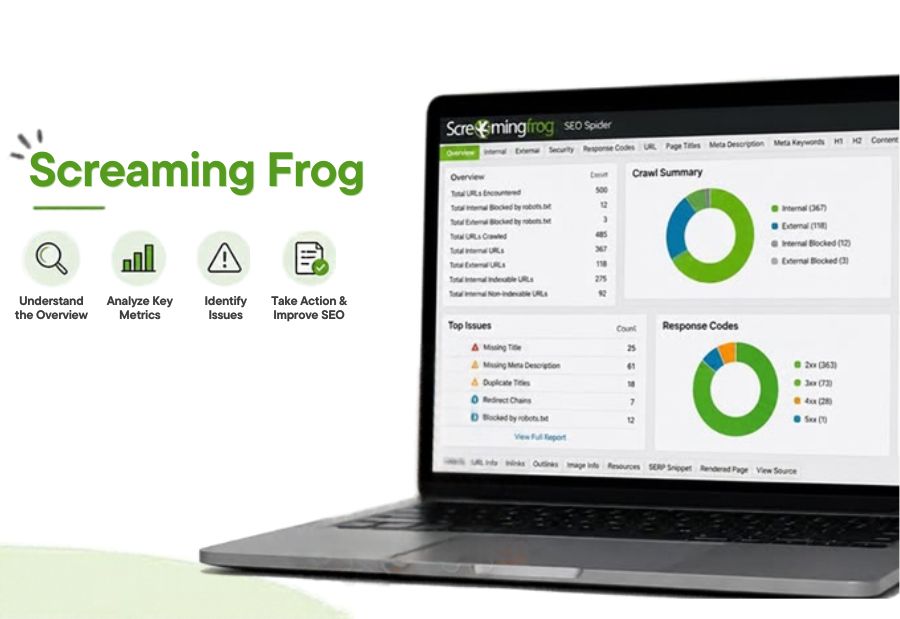
Screaming Frog SEO Spider: Features, Uses and Limitations
A website can have useful content and strong keyword targeting but still face technical SEO problems that affect how search engines crawl and understand its pages. Screaming Frog SEO Spider helps marketers investigate these issues by crawling website URLs and organising the findings into reports. Mercadeo can use website crawling insights to support technical audits, content improvements and ongoing SEO maintenance.
What is Screaming Frog SEO Spider?
Screaming Frog SEO Spider is a website crawling tool used to inspect URLs and identify potential technical and on-page SEO issues. It collects information about page titles, meta descriptions, headings, response codes, links, directives and other website elements.
Unlike a general keyword research platform, its main purpose is to help SEO teams understand a website’s structure and identify problems that need investigation.
The desktop application offers a free version with a crawl limit and a paid licence with additional capabilities. Users should check the official website for current limits and licence details.
Important Screaming Frog SEO Spider features
1. Technical website crawling
The crawler visits website URLs and collects information about their responses and page elements. This can help SEO professionals find broken pages, redirect chains, server errors and other crawl-related issues.
The results give teams a starting point for investigating problems across large websites.
2. Title tags and meta description analysis
Screaming Frog can identify missing, duplicate and potentially problematic page titles and meta descriptions. It can also highlight elements that may be unusually long or short.
These reports help content and SEO teams review metadata more systematically. However, recommendations should be based on page purpose and search intent rather than length alone.
3. Broken links and redirect analysis
Broken internal links can create poor user experiences and make website navigation less effective. The tool can help identify links pointing to error pages and review redirect behavior.
SEO teams can use these findings to update outdated links, remove unnecessary redirect chains and improve site navigation.
4. Internal linking and site structure
The crawler provides information about internal links and how pages connect across a website. Depending on the report, users can investigate link counts, crawl depth and pages receiving limited internal links.
This is useful for finding important pages that may be difficult to discover through normal navigation. Teams can then consider whether relevant internal links would improve accessibility and content discovery.
5. XML sitemap and canonical checks
Screaming Frog can help compare crawl findings with XML sitemap URLs and review canonical tags. These checks may reveal URLs that are excluded from the sitemap, inconsistent canonical signals, or pages that need closer inspection.
The tool reports what it discovers; SEO professionals must still determine the correct indexing and canonicalisation strategy.
6. Custom extraction and integrations
For more advanced audits, Screaming Frog supports custom extraction and integrations with selected data sources and services, depending on configuration and licence. These options can help combine crawl information with other SEO data or extract specific page elements.
This can be particularly useful for large content websites and recurring technical audits.
Practical uses of Screaming Frog for SEO
Screaming Frog SEO Spider can support several common SEO tasks:
- Website migrations: Review redirects, response codes and URL changes before and after a migration.
- Content audits: Find missing metadata, duplicate titles and pages that need editorial review.
- Internal link reviews: Identify important pages with weak internal linking or excessive crawl depth.
- Technical issue detection: Locate broken links, redirect problems and server response errors.
- Large website maintenance: Repeat crawls to check whether previously identified issues have been resolved.
For example, a company migrating hundreds of service pages can crawl the old and new site versions to compare URLs, check redirect destinations and identify pages that may have been missed.
Screaming Frog SEO Spider: Limitations to consider
Although the tool is useful for technical audits, it does not replace every part of an SEO workflow.
It is not a complete keyword research platform. You will generally need other tools to research search demand, evaluate keyword opportunities and study search trends.
Crawl findings require interpretation. A missing tag or flagged URL is not always a problem. Some findings are intentional and should be assessed in context.
Large crawls require resources. Crawling very large websites can require suitable memory, configuration and time. Results may also depend on crawl settings and website accessibility.
It does not guarantee indexing or rankings. Discovering and fixing a technical issue does not guarantee that Google will index a page or improve its ranking.
Some capabilities require a paid license. Crawl limits and advanced features depend on the version and license. Teams should verify current details before planning an audit.
Screaming Frog vs. All-in-One SEO Platforms
Screaming Frog and platforms such as Semrush and Ahrefs serve overlapping but different purposes. Screaming Frog focuses on crawling a website and examining its technical structure in detail. All-in-one SEO platforms generally combine several capabilities, such as keyword research, backlink analysis, competitor research and site auditing.
A practical workflow can use a crawler to identify technical issues, a keyword research tool to assess search opportunities and Google Search Console to review search performance and indexing signals.
Final Thought
Screaming Frog SEO Spider is a valuable option for finding technical and on-page SEO issues, reviewing internal links and auditing website structure. Its strength lies in detailed crawling rather than providing every SEO function in one place.
For Mercadeo, using crawl reports alongside keyword research and search performance data can support a more complete optimization process. The key is to prioritize meaningful issues, validate each finding and track whether the resulting changes improve website quality and search visibility.
About The Author
