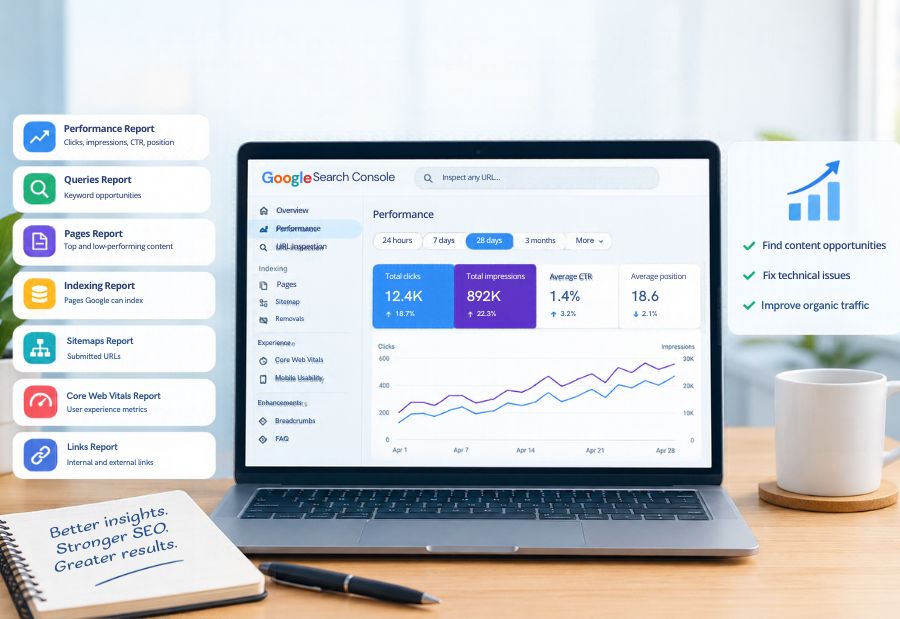
7 Google Search Console Reports Every SEO Team Should Review
SEO teams need more than keyword rankings to understand website performance. Google Search Console provides useful data on search visibility, clicks, indexing, and website experience. By reviewing the right Google Search Console reports, marketers can identify content opportunities, troubleshoot technical issues, and improve organic traffic. Tools from Google and Semrush can complement these efforts by helping teams understand search performance and identify SEO opportunities. Mercadeo can use these insights to help businesses connect SEO performance with broader digital marketing goals.
1. Performance report: Track clicks and impressions
The Performance report shows how a website appears in Google Search. It includes clicks, impressions, click-through rate (CTR), and average position.
SEO teams can use this report to identify pages that receive high impressions but relatively few clicks. These pages may need more relevant title tags, clearer meta descriptions, or content that better matches search intent.
Review the data by query, page, country, device, and date to understand where performance changes are occurring.
2. Queries report: Discover keyword opportunities
The queries view within the Performance report shows the search terms that generate impressions and clicks.
It helps teams discover keywords for which their website already has visibility. For example, a page ranking around positions 8–15 may have room to improve with more useful content, stronger internal links, or a clearer explanation of the topic.
Look for relevant queries with growing impressions, low CTR, or positions close to the first page. Prioritise opportunities that match the website’s audience and business objectives instead of targeting every available keyword.
3. Pages report: Identify high- and low-performing content
The Pages view reveals which URLs attract organic search traffic. Comparing clicks and impressions across pages helps SEO teams understand which articles and landing pages perform well.
Use this report to identify pages that have lost clicks, pages receiving impressions without enough engagement, and content that may need updating. Before changing a page, check whether its search intent, rankings, and seasonality have changed.
Teams can also use page-level data to decide where internal links or content improvements may provide the greatest value.
4. Indexing report: Check which pages google can index
The Page Indexing report shows how many pages Google has indexed and why some URLs are not indexed.
Common reasons include pages marked with a noindex directive, duplicate content, redirects, canonicalization, and URLs that Google has discovered but not crawled. Not every excluded URL is an error; some pages should remain outside the index.
Review important URLs first. If a valuable page is missing, investigate its status, canonical tag, internal links, and sitemap inclusion before requesting indexing.
5. Sitemaps report: Monitor submitted URLs
The Sitemaps report helps teams check whether submitted XML sitemaps have been processed and whether Google has encountered issues reading them.
A sitemap should generally include canonical URLs that the website wants search engines to discover. Review the report after a site migration, URL restructuring, or major publishing update.
Remember that submitting a sitemap does not guarantee that Google will crawl or index every URL. It supports discovery, while indexing depends on several other factors.
6. Core web vitals report: Review user experience
The Core Web Vitals report groups URLs according to their real-world loading, interactivity, and visual stability performance when sufficient data is available.
The key metrics are Largest Contentful Paint (LCP), Interaction to Next Paint (INP), and Cumulative Layout Shift (CLS). Poor results may indicate slow page rendering, delayed interactions, or unexpected layout movement.
Use the report to identify groups of URLs that need attention, then investigate individual pages with tools such as PageSpeed Insights. Improving these metrics can support a better user experience, although it does not guarantee higher rankings.
7. Links report: Understand internal and external links
The Links report provides information about external links pointing to the website and internal links between its pages.
External links can help teams understand which pages attract references from other websites. Internal link data can reveal important pages that receive limited internal linking.
Use these insights to strengthen relevant connections between related articles and service pages. Check whether priority pages are easy to reach through the site’s navigation and contextual links.
How often should SEO teams review these reports?
The review frequency depends on website size and publishing activity. A practical routine may include:
- Weekly: Review clicks, impressions, major query changes, and important indexing issues.
- Monthly: Compare page performance, review content opportunities, and track Core Web Vitals trends.
- After major changes: Check indexing, sitemaps, redirects, and search performance following a migration or website update.
Mercadeo can use this reporting routine to organise SEO reviews around measurable priorities rather than isolated ranking changes.
Final Thought
Google Search Console reports help SEO teams understand how Google discovers, indexes, and presents their content. Reviewing these reports consistently can uncover content improvements, technical problems, and new search opportunities.
The key is to turn observations into actions. Prioritise pages that matter to your audience, investigate the reasons behind performance changes, and measure results over time. A structured reporting process helps businesses make more informed SEO decisions.
About The Author
